

Your infrastructure, your cloud, your data.
The document platform remains in the client's environment and the AI services run in the client's own cloud subscription. Arqueum provides the AI Hub, which orchestrates indexing, search, and generation — without retaining content.
Five deployment scenarios
From pure on-premises to AI in any of the three clouds.
Client · own datacenter — no public cloud
-
Arqueum web application
IIS · browser access
-
Application server
Arqueum Worker · Windows Service
-
SQL Server
Arqueum database
-
File repository
disk / UNC or SQL Server
Local AI services · within the same organization
-
AI Hub
local instance · RAG
-
Local semantic index
vector search in the datacenter
-
Local language model
sized during the project
-
Local OCR and speech
optional, per scope
User channel
-
User
browser · Office · internal network
-
Chat in Arqueum
no external channel
- Arqueum in the client's environment
- AI services (search + generation)
- User channel
No traffic leaves the client's organization. The sizing of the local model is defined during the project.
Client · on-premises
-
Arqueum web application
IIS · browser
-
Application server · ①
Arqueum Worker
-
SQL Server + repository
data and files within the organization
-
User · ⑤
Arqueum, Teams, or Google Chat
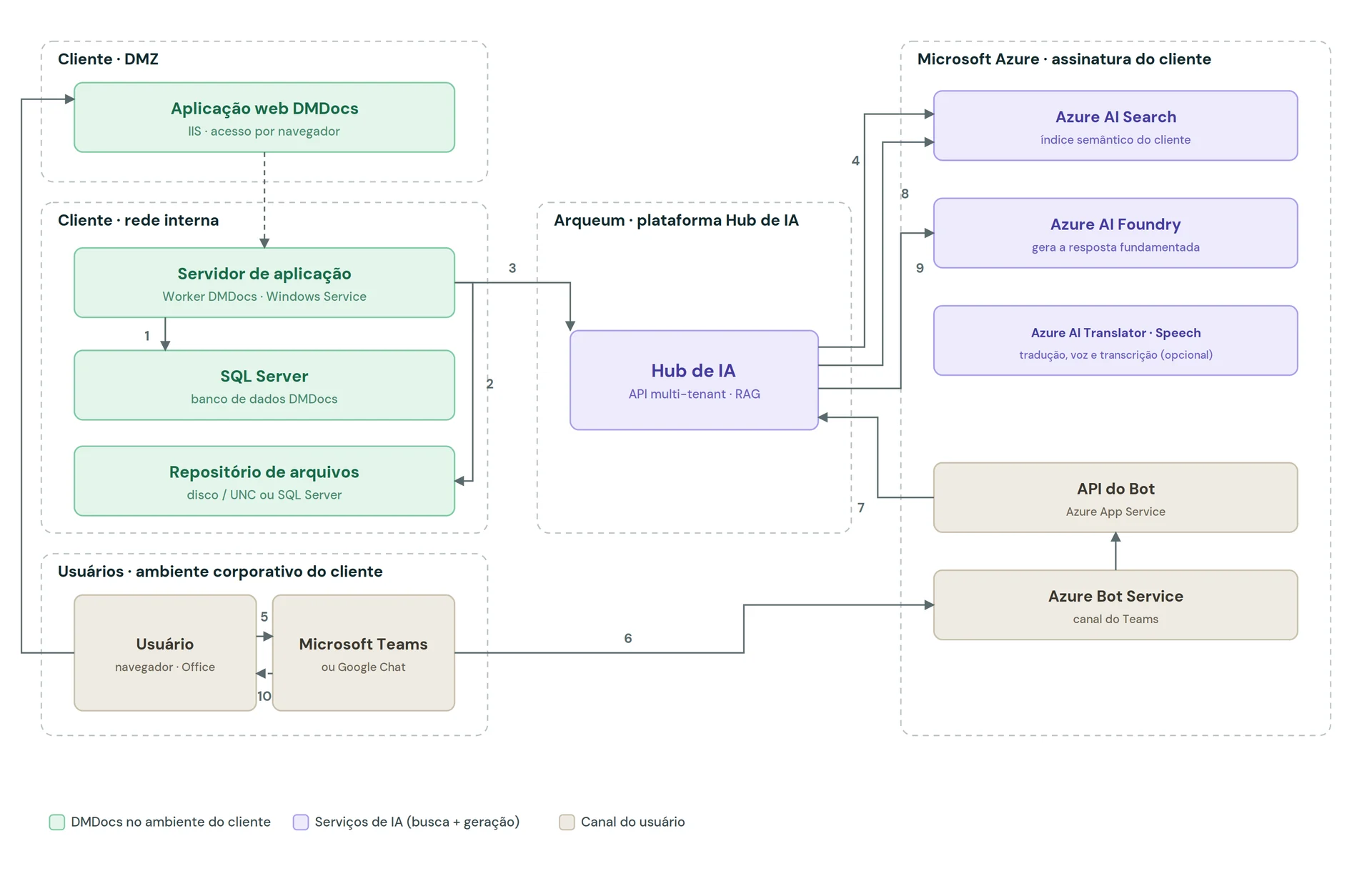
Client's cloud · AI per service
-
Arqueum AI Hub · ② ③
orchestrates without retaining content
-
Semantic index · ④
Azure AI Search · OpenSearch · Agent Search
-
Generative model · ⑥
Foundry · Bedrock · Gemini
-
Translation · speech · OCR · optional
per service, per contract
-
Bot API + channel · ⑦
Teams requires an Azure Bot registration
- Arqueum in the client's environment
- AI services (search + generation)
- User channel
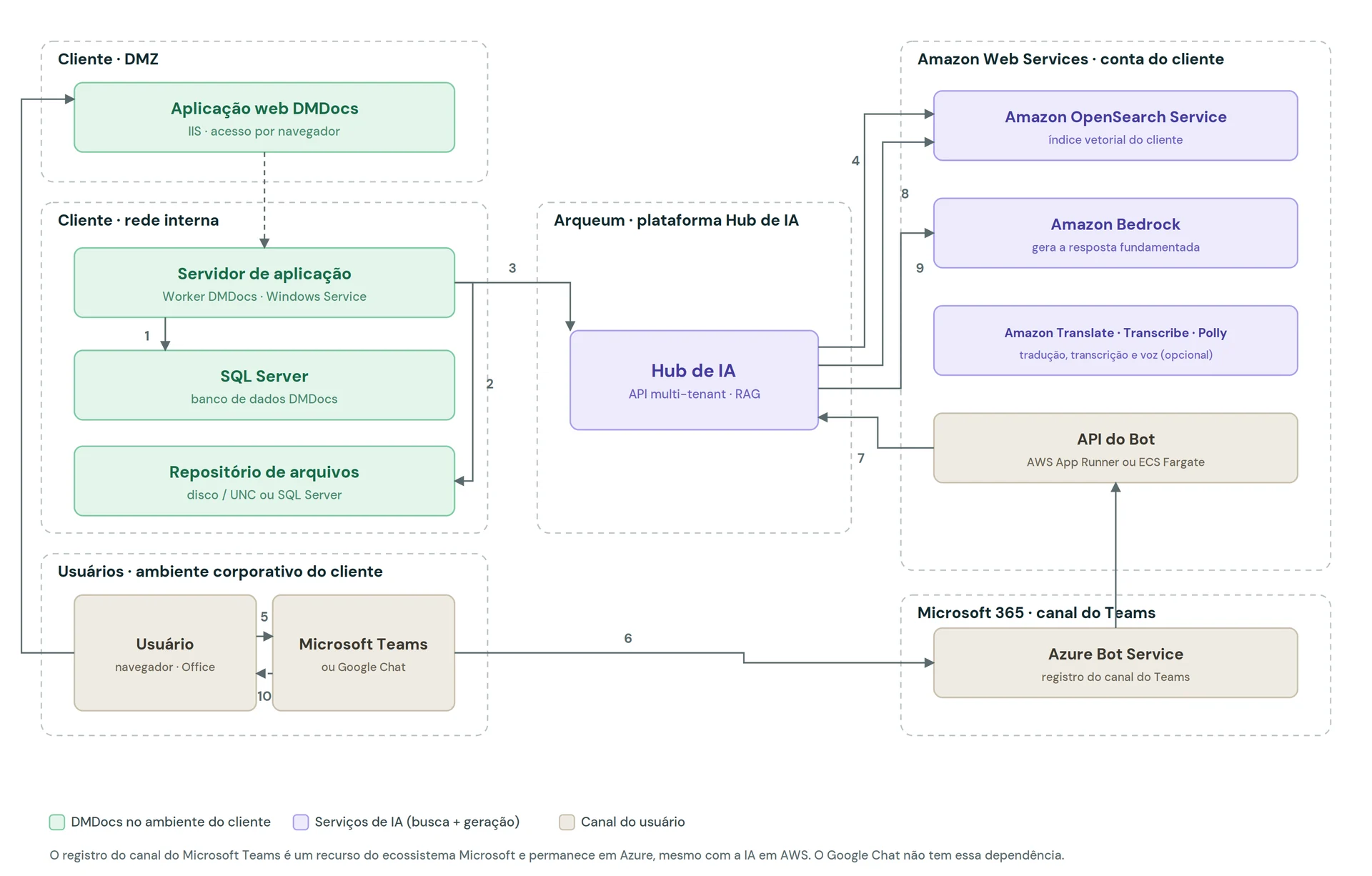
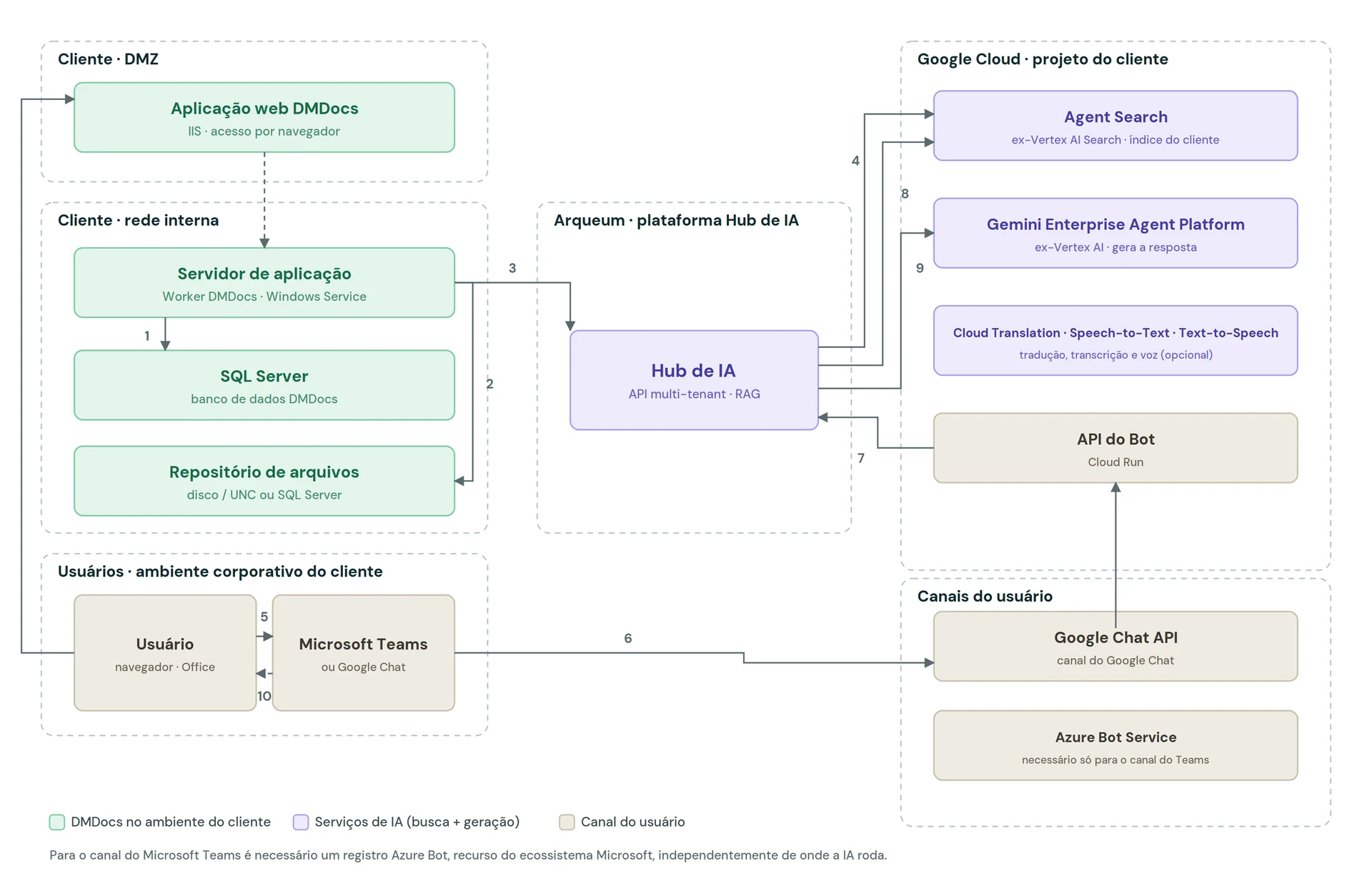
① reading of metadata and files · ② sending to the Hub · ③ indexing · ④ search with the user's permission applied · ⑤ question · ⑥ grounded generation · ⑦ answer with cited sources
The AI services run in the client's own cloud subscription — the document remains within the organization.
Switching providers is a configuration change — not a migration project.
See multi-locationThe 10 steps of the information flow
From reading the document to the answer with sources — the complete path of a question.
- 1 The back-end service reads the document's metadata from the database.
- 2 And reads the corresponding file from the file repository.
- 3 It sends the content to the Arqueum AI Hub.
- 4 The Hub indexes the content in the search service of the client's cloud.
- 5 The user asks the question in Microsoft Teams (or in Google Chat, or in Arqueum itself).
- 6 The bot channel forwards the message.
- 7 The bot API calls the AI Hub.
- 8 The Hub searches the index, with the user's permission applied.
- 9 The model generates the answer from the authorized excerpts.
- 10 The answer is delivered to the user with the sources cited.
Service equivalence matrix
The same function in each cloud.
| Function in the solution | Microsoft Azure (default) | Amazon Web Services | Google Cloud |
|---|---|---|---|
| Semantic index and search | Azure AI Search | Amazon OpenSearch Service (vector index) | Agent Search (formerly Vertex AI Search) |
| Generative model | Azure AI Foundry | Amazon Bedrock | Gemini Enterprise Agent Platform (formerly Vertex AI) |
| Translation | Azure AI Translator | Amazon Translate | Cloud Translation |
| Audio transcription | Azure AI Speech | Amazon Transcribe | Speech-to-Text |
| Read-aloud | Azure AI Speech | Amazon Polly | Text-to-Speech |
| OCR and extraction | Azure Document Intelligence | Amazon Textract | Document AI |
| Bot API hosting | Azure App Service | AWS App Runner or ECS Fargate | Cloud Run |
| Microsoft Teams channel | Azure Bot Service | Azure Bot Service (Microsoft resource) | Azure Bot Service (Microsoft resource) |
| Google Chat channel | Google Chat API | Google Chat API | Google Chat API |
| Corporate identity | Microsoft Entra ID | IAM and the client's identity provider | Cloud Identity and IAM |
| Secrets and keys | Azure Key Vault | AWS Secrets Manager | Secret Manager |
| Observability | Azure Monitor | Amazon CloudWatch | Cloud Monitoring |
Names follow each provider's current catalog and change over time — the function of each component in the architecture remains the same. Verified in August 2026.
The Microsoft Teams channel registration is a Microsoft-ecosystem resource and remains on Azure, even when the AI services run on AWS or Google Cloud. Google Chat has no such dependency.
Frequently asked questions
- Does the platform run on-premises?
- Yes — it runs on-premises, on your own infrastructure, and also in the customer's private cloud, on Microsoft Azure, Amazon Web Services or Google Cloud.
- Does the platform run in the cloud?
- Yes — it runs in the customer's own private cloud (Azure, AWS or Google Cloud) and also on-premises, including the hybrid scenario: the document platform in your environment and the AI services on your cloud subscription.
- Does my data leave my environment?
- No. From the published document to the cited answer, every step runs in the customer's environment and cloud subscription — data residency is a configuration decision, which gives legal teams a clear answer.
- Does it work across sites with a poor link?
- Yes. Each site has its own application server and database: browsing, search and access run on the local server, and the operation continues even with the link down — the link is for syncing, not for working.
- Is there a high-availability scenario?
- Yes — duplicated application servers, the database in an availability group (SQL Server Always On), a file repository external to the servers and proactive monitoring; final sizing is defined during the project.
- How does the platform authenticate users?
- Through the customer's corporate directory — Microsoft Entra ID, IAM or Cloud Identity — with group synchronization; provider credentials and keys are encrypted at rest, with one key per service and per-customer isolation.
Bring your security team into the conversation.
We answer the CISO's questions with diagrams, permissions, and audit trail — not with promises.